
Game Rules
- All wins are paid for combinations of the same symbol on an active line.
- Wild substitutes for any other symbol.
- Wins from different lines are added together.
Special Features
 | Wild Symbol Wild substitutes for any other symbol. |
Symbol Payout Values (Examples)
| x3 – 4.00 GBP |
 | x3 – 0.80 GBP |
 | x3 – 0.80 GBP |
 | x3 – 0.80 GBP |
 | x3 – 0.80 GBP |
 | x3 – 0.40 GBP |
 | x3 – 0.40 GBP |
 | x3 – 0.40 GBP |
 | x3 – 0.40 GBP |
Paytable shows the win for minimum bet.
Winning Bet Lines

Malfunction voids all pays and plays.
The RTP is shown in-game.
Main Game
 | Play Button Click to start playing at the current bet level. |
 | Autoplay Settings (If Available) Click to access the Autoplay settings menu: Number of games: Select the amount of spins. At any win: Stops Autoplay at any win. If single win exceeds: Stops Autoplay if a single win exceeds the set amount. If cash increases by: Stops Autoplay if the balance increases by the set amount. If cash decreases by: Stops Autoplay if the balance decreases by the set amount. Please note that Autoplay may not be available in this jurisdiction. |
 | You can change the bet value by:
|
Active Counters: Win – Current win. Total Bet – Current bet in cash. | |
 | Balance Current account balance. |
 | Gamble Risk your win for a chance to double it. |
 | To Credit Claim your win without next spin. |
 | Game Settings Click to access the game settings and game information: Full Screen Mode: Click to switch full screen mode on or off. Use Space Key: Use space key as a spin button. Energy Saving Mode: Use Energy Saving Mode to conserve battery. Big Win Presentation: Click to switch big win animations on or off. Ultra Lite Mode: Switch to Ultra Lite Mode for faster load times. Game History: Click to view your latest game history. Advanced / Unique Gambling: Click to select the standard risk mechanism. Standard / Card Gambling: Click to select a quick risk mechanism. |
 | Sound Settings Click to access the sound settings: Mute: Click to mute all sound effects and music. Sound Volume: Click to switch sounds on or off. Music Volume: Click to switch music on or off. |
 | Game Rules Click to view game rules. |
 | Paytable Click to view winning combinations and payouts. |
 | Game History Click to view your latest game history. The game history is available only when playing for money. |
 | Close Full Screen Click to close full screen. |
Gamble Feature
- The Gamble feature gives a chance to double each win.
- After activating the Gamble feature, a player can:
- take the win and end the Gamble feature,
- continue playing the Gamble feature by selecting one of the two symbols.
- After selecting a symbol, a draw is made to determine the winning symbol.
- The player can end the Gamble feature after each round.
- In the event of a loss, the player loses the win value specified in the current win counter and returns to the main game.
- The Gamble feature has seven rounds.
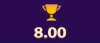 | Current Win – amount of win that can be taken. |
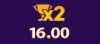 | Double To – win amount after a correct guess. |
Additional Information
The following game features and settings may be subject to the terms and conditions of the gaming site. For more information on the following, please contact the game provider:
- The procedures used to manage unfinished game rounds.
- The time after which inactive game sessions automatically end.
In the event of malfunction of the gaming hardware/software, all affected game bets and payouts are rendered void and all affected bets refunded.
Games that do not feature interrupted rounds are either rolled back with the bet being refunded or completed by awarding a win. Games that feature interrupted rounds and are not complete will last for 90 days.
Play Game 🎰Note: Magic Stars 3 Demo Play Info and Free Play Features
If you’ve read the information above or are simply exploring this game for the first time, you might be looking for a way to access Magic Stars 3 demo play or free play mode. While demo access is not always available, this page provides detailed information based on the game’s official help content.
Learn how features like free spins, bonus symbols, wilds, and payouts work, just as you would in a typical demo version. Whether you are reviewing the mechanics before real play or comparing Magic Stars 3 to other slots, the overview here helps simulate the experience of trying the game for free.
*All values (Bet Levels, Maximum Wins etc.) mentioned in relation to this slot game are subject to change at any time. Game features mentioned may not be available in some jurisdictions.
